
Resource Library
Trusted tools and guides for safer families.
The free services, apps and guides we use in our classes and recommend to our own families, sorted by the problem you are trying to solve. Most are free. Each one is here because it helps, not because anyone paid.
Jump to a topic

Kids, first phones and parental controls
Start with the free controls already on your devices. Add an app or a kid-safe phone if your family needs more. Compare a few before you choose.
Official class supporter

Kid-safe phone · Class supporter
Pinwheel
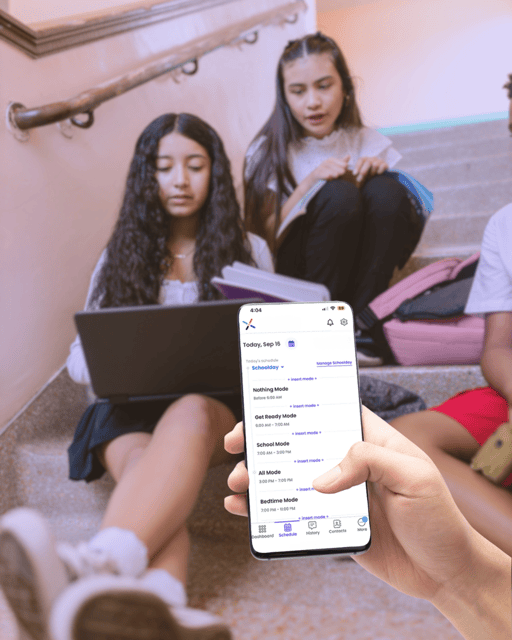
A smartphone built for kids, with a caregiver portal where parents approve every app and contact. Their parents’ guide compares kid-phone options in plain language.
- Parents approve every app
- Parents approve every contact
- Schedules for school and bedtime
“You wouldn’t hand a teenager the keys to a car without teaching them to drive. A first phone deserves the same approach.” — Pinwheel
Thank you to Pinwheel for providing a sample phone and family brochures for our free Family Internet Safety classes.
See all 8 resources
Built in · Free
Apple parental controls
Screen Time and Family Sharing let you set limits, approve downloads and filter content on iPhone and iPad without buying anything.
Built in · Free
Google Family Link
Manage apps, screen time and location on Android phones and Chromebooks.
Kid-safe phones and watches
Gabb
Phones and smartwatches for kids without open internet or social media, designed as a first step before a full smartphone.
Monitoring app
Bark
Scans texts, email and social media for signs of bullying, predators and self-harm, and alerts parents without showing every message.
Parental controls app
Qustodio
Screen-time limits, web filtering and activity reports across phones, tablets and computers.
Free · Nonprofit
Common Sense Media
Age ratings and honest reviews of apps, games, shows and movies, written for parents.
Free · Nonprofit
ConnectSafely
Short, practical parent guides to individual apps and platforms.
OnlineFamilySafety.com guide
Set up your child’s first phone together
Settings, ground rules and a family agreement, done side by side with your child.

Teaching kids to be safe online
Kids remember what they play. These free programs teach safety through games, stories and activities you can do together.
Official class supporter


Free for families · Class supporter
CAPY by KnowBe4
A free family hub starring CAPY the capybara, with games, coloring books and tip sheets that teach kids about passwords, scams and privacy.
- Games and coloring books
- Tip sheets for families
- Free to use
“CAPY is a free online hub from KnowBe4 that provides cybersecurity awareness training and safety resources for the entire family.” — KnowBe4
Thank you to KnowBe4 for donating CAPY stickers and plush toys and for letting us print CAPY materials for every family in our classes.
See all 2 resources
Free · Nonprofit
NetSmartz
Age-appropriate videos, games and tip sheets from the National Center for Missing & Exploited Children.
Free
Be Internet Awesome
Google’s free digital-safety program, with family activities and the Interland game.

Scams and fraud
Scammers change their stories constantly. These sources track the newest tricks and tell you exactly what to do.
See all 6 resources
Free · U.S. government
FTC Consumer Advice
Plain-language guides to current scams, from fake delivery texts to impostor calls, plus free scam alerts by email.
Free · U.S. government
Report a scam to the FTC
Reporting takes a few minutes, gives you next steps for your situation, and helps investigators spot patterns.
Free · Nonprofit
AARP Fraud Watch Network
Scam tracking, alerts and a free helpline staffed by trained volunteers. You do not need to be an AARP member. Helpline: 877-908-3360.
Free · Mississippi
Mississippi Attorney General, Consumer Protection
Report scams and unfair business practices in Mississippi and find consumer guides. Call 601-359-3680.
Free · Newsletter
SANS OUCH!
A free monthly one-page security newsletter for everyday people, written by the SANS Institute. Easy to share with family.
OnlineFamilySafety.com guide
Why your family needs a code word
AI can now copy a loved one’s voice. A family code word stops a fake emergency call in seconds.

Protecting older adults
Scammers target grandparents because they are trusting and often home. These resources are written for them and for the people who help them.
See all 4 resources
Free · U.S. government
FTC Pass It On
Short, respectful materials about common scams, written for older adults to read and pass along to friends.
Free · U.S. Department of Justice
National Elder Fraud Hotline
Case managers help people 60 and older report fraud and find next steps. Call 833-FRAUD-11 (833-372-8311), Monday to Friday, 10 a.m. to 6 p.m. Eastern.
Free · Nonprofit
AARP Mississippi
Fraud-prevention events, volunteer programs and local news for Mississippi families.
OnlineFamilySafety.com guide
Help an aging parent watch their accounts
Simple ways to keep an eye out for fraud while respecting a parent’s independence.

Passwords, passkeys and two-step sign-in
Taking over your email is how most account trouble starts. A password manager and a second sign-in step stop the large majority of it.
See all 6 resources
Free · U.S. government
CISA Secure Our World
Four habits that stop most attacks: strong passwords, multifactor authentication, spotting phishing and updating software. Free tip sheets to print.
Free · Explainer
Passkeys, explained
The FIDO Alliance, the group behind the passkey standard, explains how passkeys replace passwords and why scammers cannot phish them.
Password manager · Free and paid plans
Bitwarden
An open-source password manager with a free plan for individuals and a low-cost family plan.
Password manager · Paid, free trial
1Password
A polished password manager with a Families plan for safely sharing logins with the people you trust.
Password manager · Free and paid plans
Proton Pass
A privacy-focused password manager from the makers of Proton Mail, with a free plan and hide-my-email aliases.
Security keys · Paid
Yubico YubiKey
A small hardware key that proves it is really you when you sign in. The strongest protection for email and money accounts.
Before you buy anything: the password manager built into your phone (Apple Passwords or Google Password Manager) is a solid free start.

Home Wi-Fi and devices
Your router is the front door to every device in the house. A few settings keep strangers, and your smart gadgets, away from the devices you bank and do schoolwork on.
See all 3 resources
OnlineFamilySafety.com guide
Set up guest Wi-Fi in 10 minutes
Keep smart TVs, doorbells and visitors’ phones off the network your family uses for banking and school.
Free · U.S. government
Secure Our World tip sheets
Free, printable one-page tip sheets and posters on software updates, passwords and phishing. Good for the fridge or a family meeting.
OnlineFamilySafety.com printable
Home Gadget Checklist
A one-page walk-through of the connected devices in your home and the setting to check on each.

Gaming
Most popular games include chat, purchases and strangers. Every major platform has free controls; these pages show you where they are.
See all 4 resources
Free · Parent tools
Xbox family settings
Set spending limits, screen time and who can chat with your child on Xbox.
Free · Parent tools
Roblox parent resources
Parental controls, spending limits and conversation guides from Roblox.
Free · Nonprofit
ESRB tools for parents
Explains game ratings and links to step-by-step parental controls for every major console.
Free
Microsoft digital safety resources
Family safety toolkits from Microsoft, including a guide to gaming safety.

Identity theft and credit freezes
A credit freeze is free, takes about 15 minutes per bureau, and is the single best defense against someone opening accounts in your name, or your child’s.
See all 4 resources
Free · U.S. government
IdentityTheft.gov
The FTC’s personalized recovery plan for adults and children, with pre-filled letters and reports.
Free · Nonprofit
Identity Theft Resource Center
Free one-on-one help from trained advisors by phone or text: 888-400-5530.
Free · All three bureaus
Freeze your credit
Freezes are free for adults and children and do not affect your credit score. Place one at each bureau.
OnlineFamilySafety.com guide
Freeze your child’s credit, step by step
Children are prime targets because no one checks their credit for years.

Thank you
Organizations supporting our free classes
Our Family Internet Safety classes are free for every family. These organizations donated materials so attendees go home with more than notes.
Class supporter
KnowBe4 and CAPY
KnowBe4 donated CAPY stickers and 25 Happy Capy plush toys for class giveaways, and gave us permission to print CAPY coloring books, games and tip sheets for every family.
Class supporter
Pinwheel
Pinwheel is providing a sample phone for our side-by-side kid-phone demonstration and brochures for families to take home.
“You wouldn’t hand a teenager the keys to a car without teaching them to drive. A first phone deserves the same approach.” — Pinwheel
Join them
Support a class
Classes are free and volunteer-run. If your organization has materials, devices or printing that would help families, we would love to hear from you.
Teaching a class in your community?
Churches, libraries and community groups can get free printed materials too. The FTC ships brochures and bookmarks on scams and identity theft at no cost through bulkorder.ftc.gov; we use them in our own classes. Our free printables are yours to copy, and if you would like to teach the full course, get in touch.
How we choose what goes on this page
- Every resource is here because it helps families. No one pays for a listing, and there are no affiliate links on this page.
- Class supporters donated materials or devices for our free classes. They are marked on this page, they do not review or approve our advice, and they never receive attendee information.
- Products are examples to compare, not endorsements. The free controls built into your phone are often enough.
Last reviewed: November 14, 2026. Links and phone numbers can change; confirm on each organization’s website. In an emergency, call 911. For crisis support, call or text 988.

